Everything Your Warehouse Needs, Built In.
ContainerMaster 4 covers every stage of warehouse operations — from inbound containers and outbound collections to gate passes, outturn reports, and live stock management.
Jump to a feature
Live Dashboard
Today's warehouse at a glance — inbound and outbound pipelines, live stock metrics, and an hourly arrival heatmap, all on one screen.
- Summary cards: Inbound Booked, Outbound Booked, Stocked In, Loaded Out, Inbound Pending, Outbound Pending
- Containers Inbound pipeline: Pending → On Site → Stocked In with individual container cards per stage
- Collections Outbound pipeline: Pending → On Site → Loaded Out with per-collection detail
- Average inbound dwell time calculated and displayed live
- Arrival Heatmap — hourly breakdown of inbound vs outbound activity across the working day
- Mobile-friendly view — on phones the kanban board switches to a clean at-a-glance summary with large, easy-to-read counts for all statuses
“See everything moving through your warehouse today — the moment you open CM4.”
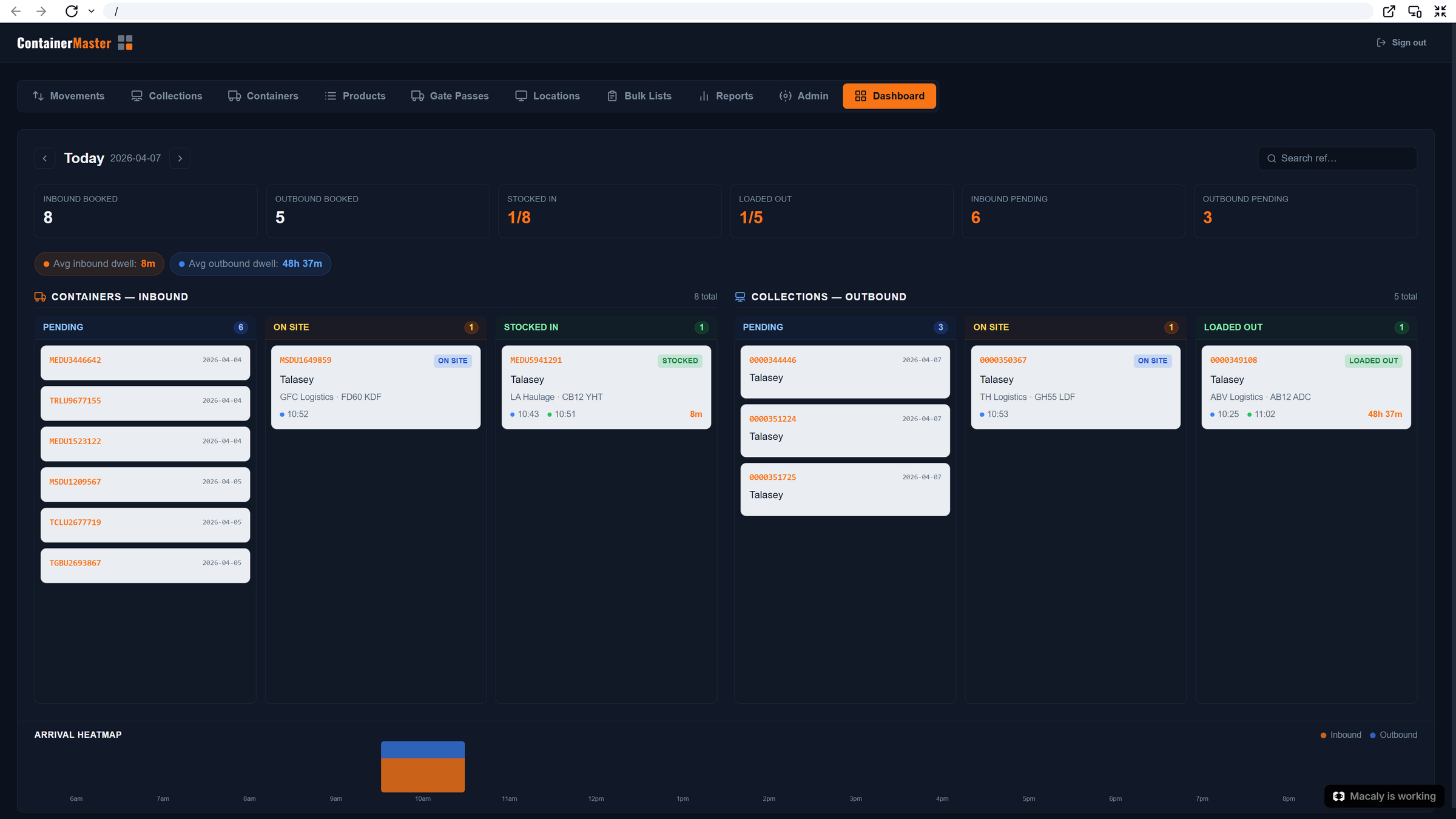
Cross-Docking Alerts
CM4 automatically detects when an inbound container is delivering the same products that an outbound lorry is collecting — and flags the opportunity directly on the dashboard so goods can go straight from the box to the lorry without ever touching the warehouse floor.
- Dashboard container and collection cards are visually marked with a diagonal stripe pattern whenever a cross-docking opportunity is detected
- Triggered automatically when an inbound container and an outbound collection share matching product lines on the same day
- No manual checking required — CM4 compares inbound and outbound product lists in real time and surfaces the alert instantly
- Eliminates unnecessary put-away and re-picking — products move direct from the incoming container to the waiting lorry
- Cuts dwell time, reduces the warehouse space needed for temporary storage, and accelerates the outbound load
- Saves significant handling time on every cross-docked load — fewer touches means fewer errors and faster turnaround
“Spot cross-dock opportunities the moment they arise — zero extra handling, maximum throughput.”
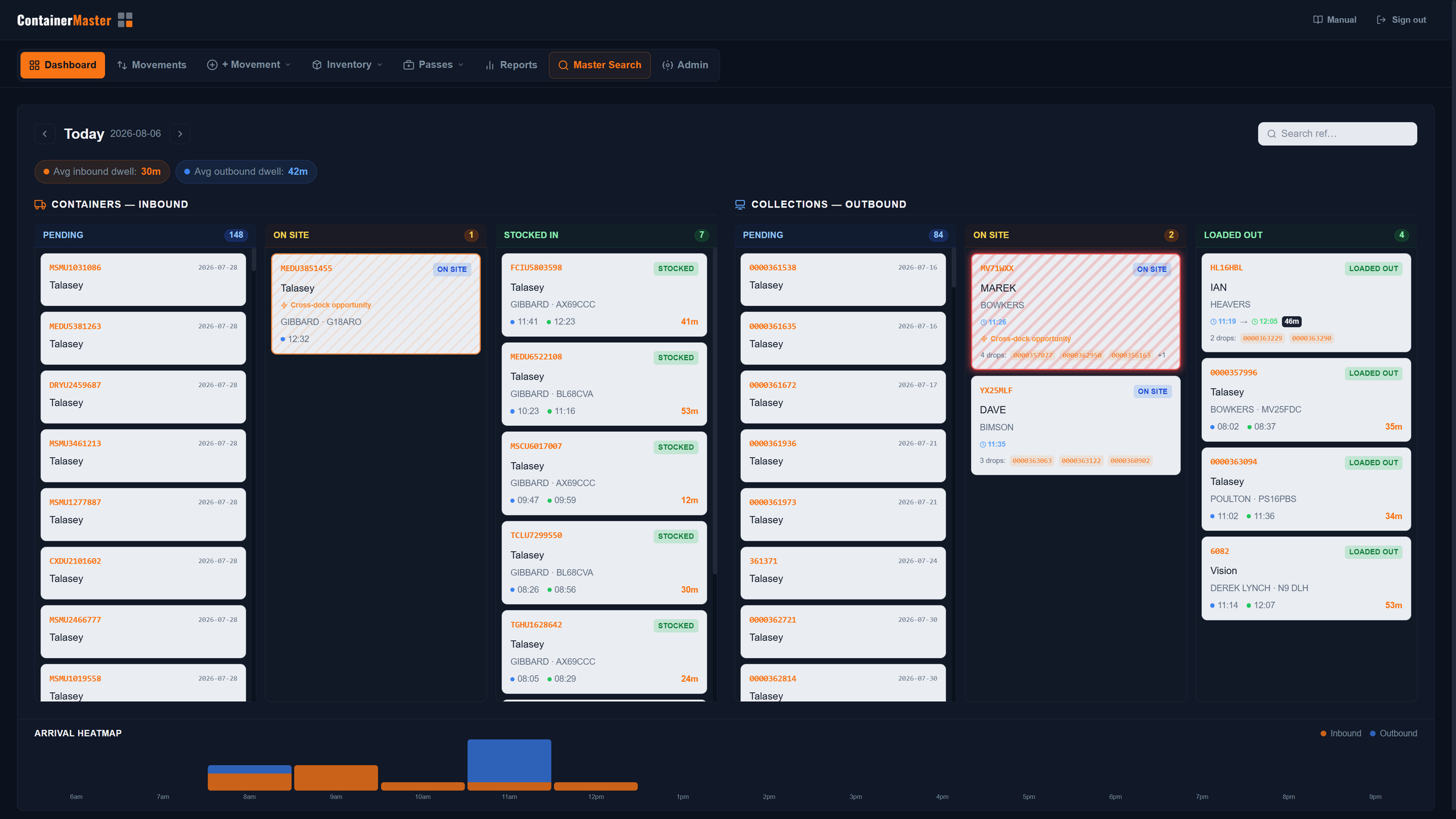
MasterSearch
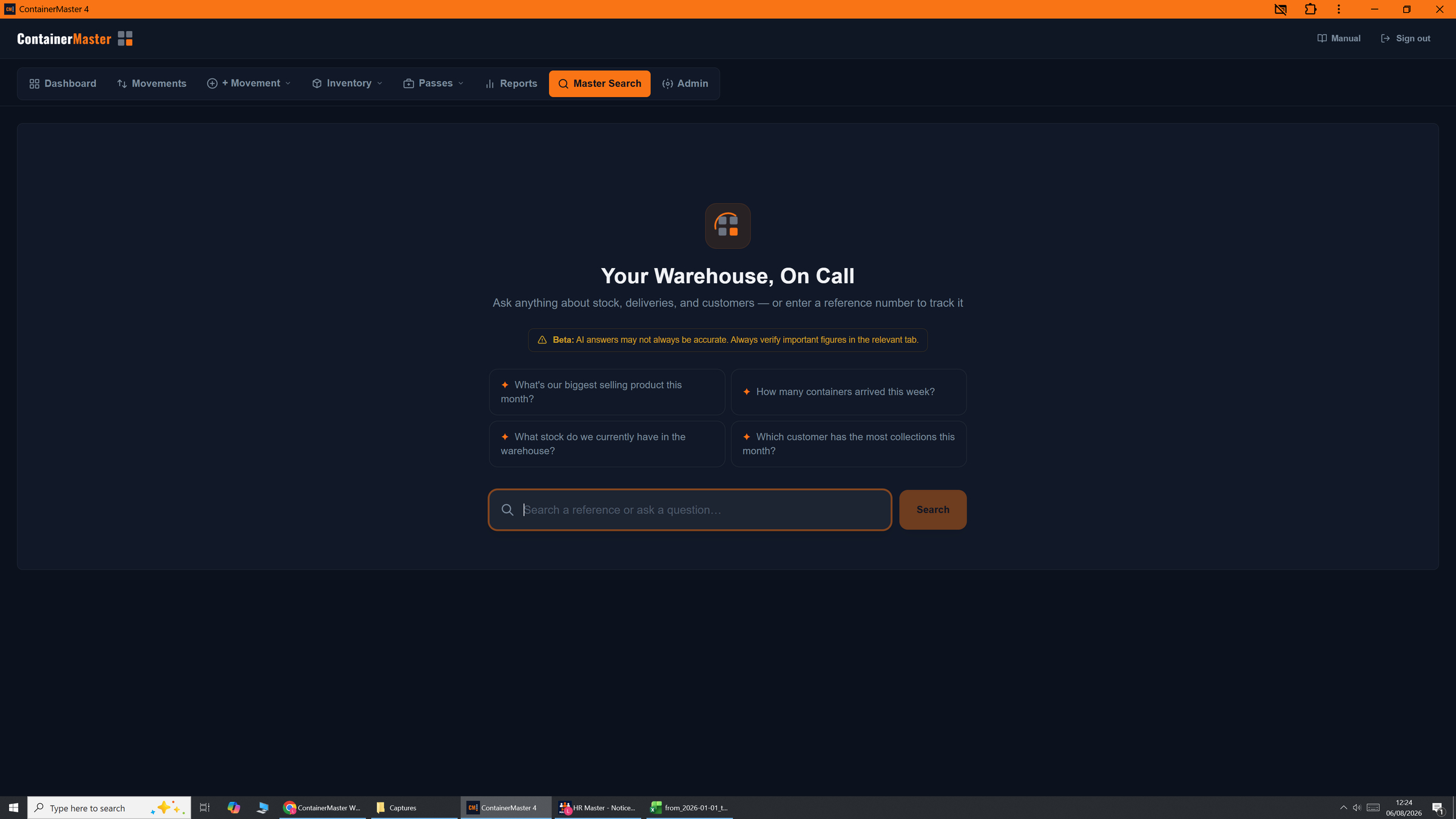
Ask anything about your warehouse — in plain English. MasterSearch combines AI-powered natural language queries with instant reference lookup, giving every team member a direct line to the data they need without hunting through tabs.
- Ask natural language questions: "What's our biggest selling product this month?", "How many containers arrived this week?", "Which customer has the most collections?"
- AI reads your live warehouse data and returns a direct, plain-English answer — no filters, no reports, no spreadsheets
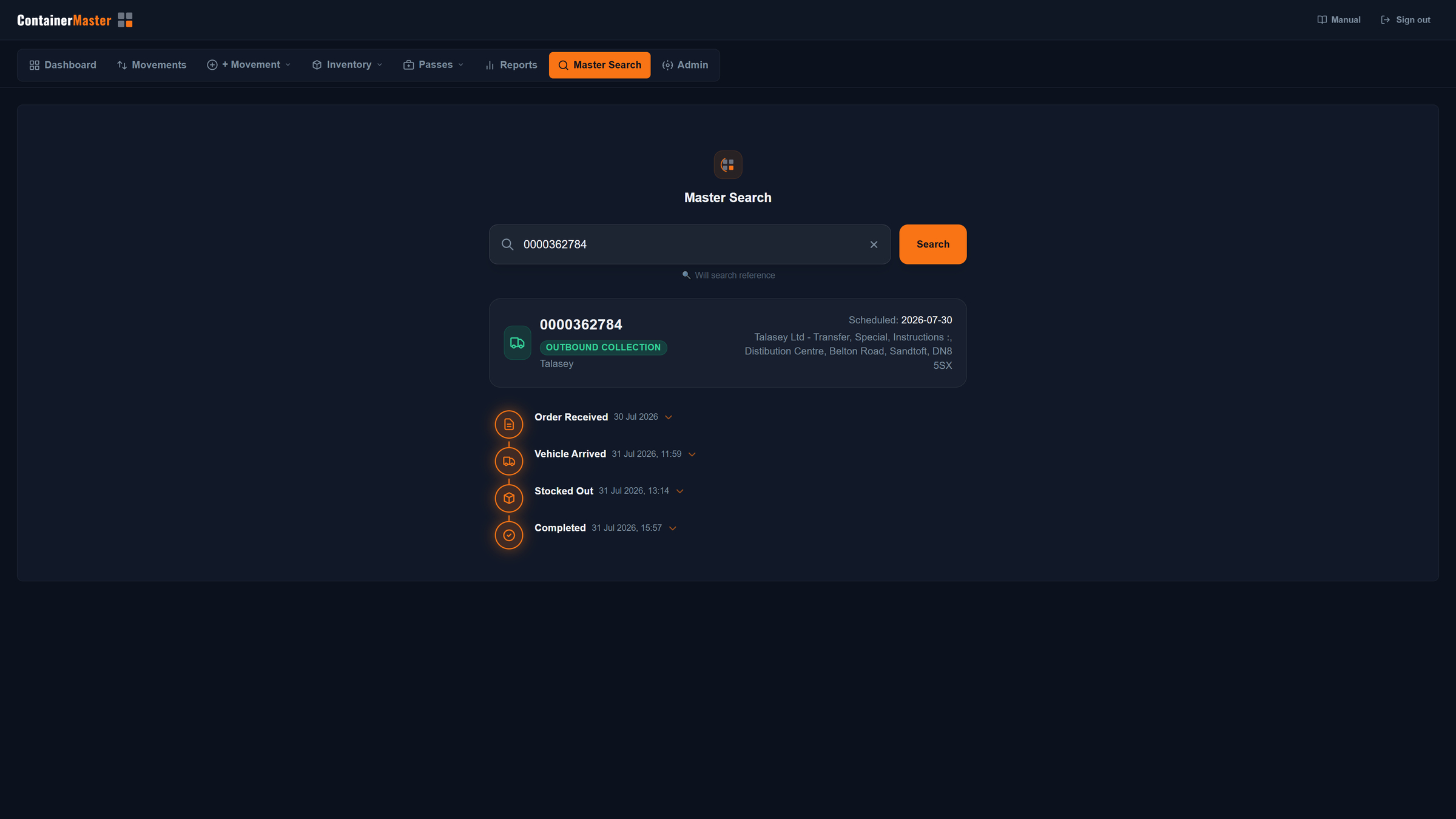
- Reference lookup mode — enter any order or container reference to instantly pull the full movement timeline
- Timeline shows every stage with exact timestamps: Order Received → Vehicle Arrived → Stocked Out → Completed
- Expandable timeline entries reveal the full detail behind each stage
- Available to all users — no technical knowledge required to query the entire warehouse history
“Your warehouse data, answering back. Any question, any reference, any time.”
Multi-Drop Load Planning
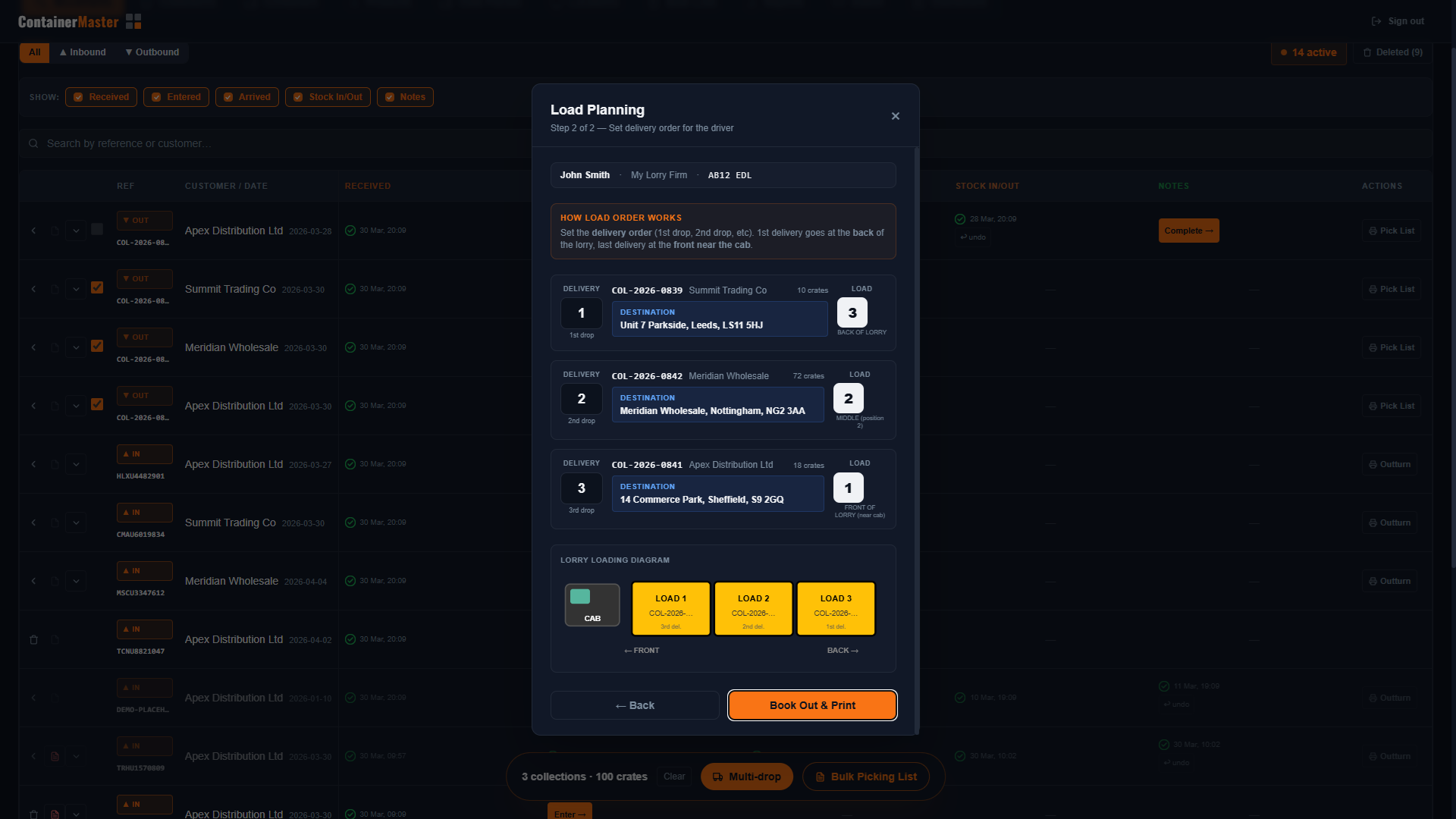
Plan lorry loads with multiple delivery stops, set the drop order, and let CM4 calculate the exact loading sequence — with a visual lorry diagram printed on every picking list.
- Select multiple outbound collections from the Movements tab and book them out together on one lorry
- Step 1: Enter driver name, haulier company, and vehicle registration
- Step 2: Set delivery order — drag collections into 1st drop, 2nd drop, 3rd drop, etc.
- CM4 auto-calculates load order: 1st drop = loads last at the back, 3rd drop = loads first near the cab
- Visual SVG lorry loading diagram shows exactly how the load should be built
- Load position number and drop sequence printed on every picking list for the warehouse team
“The lorry diagram eliminates loading errors and speeds up warehouse picks.”
Demand Forecasting
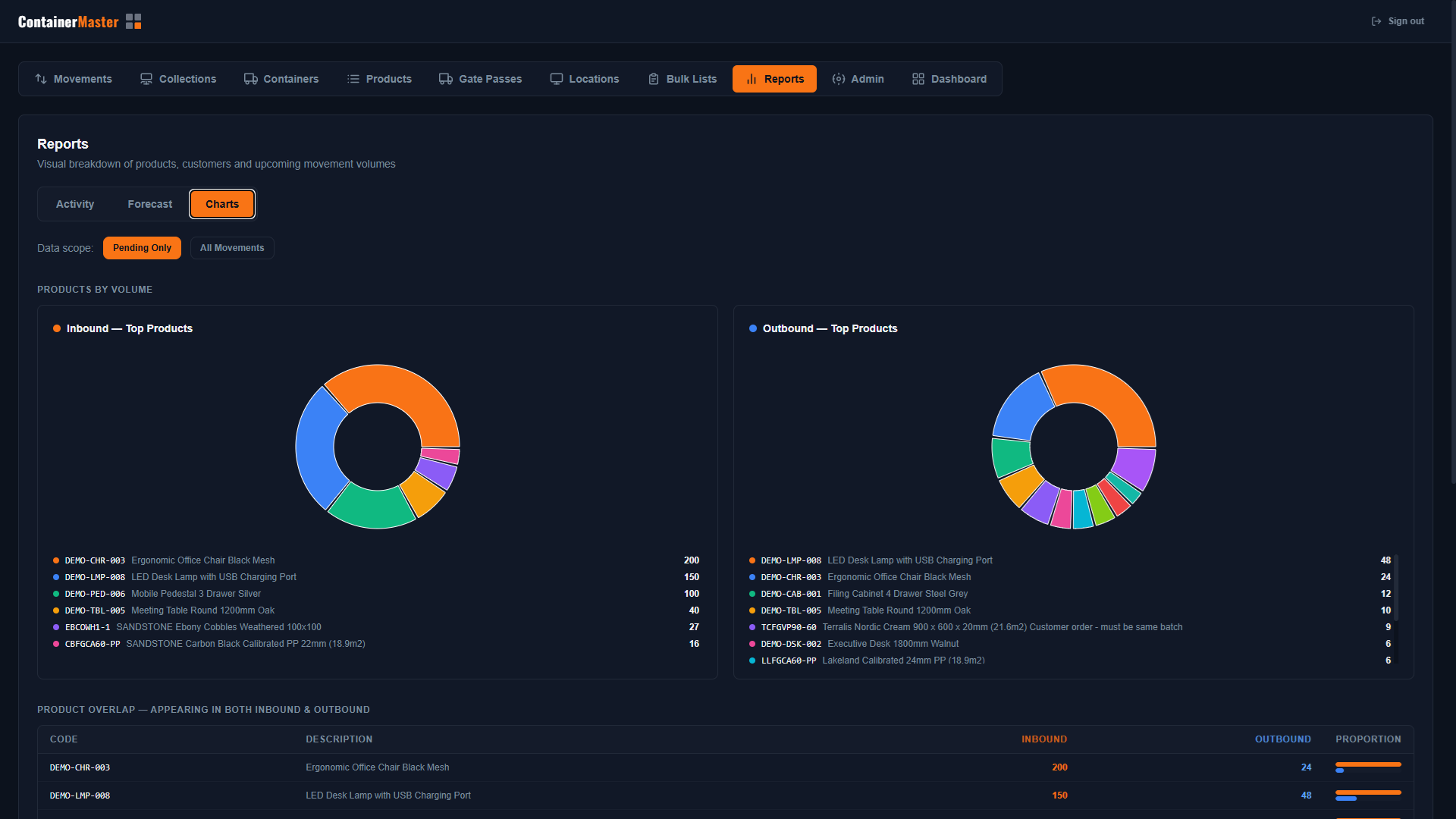
See exactly what's arriving and what's moving before it happens — so your team can plan storage locations, allocate space, and prepare the warehouse floor in advance.
- Forecast view — upcoming container arrivals listed by ETA, ship name, and customer, so you know what space to prepare and where
- Pending collections view — outbound orders due to depart, giving you visibility of which bays will free up
- Charts view — top inbound and outbound products by volume as donut charts, instantly showing which product lines drive the most throughput
- Customer volume bar chart — inbound vs outbound units per customer (top 3), helping you allocate dedicated zones for your highest-volume clients
- Movement timeline — units by date showing when peaks and troughs occur, so staffing and space can be planned ahead
- Toggle between Pending Only and All Movements to focus on what's still to come vs. the full picture
“Know what's arriving before it arrives — plan your storage, not your problems.”
5-Stage Workflow
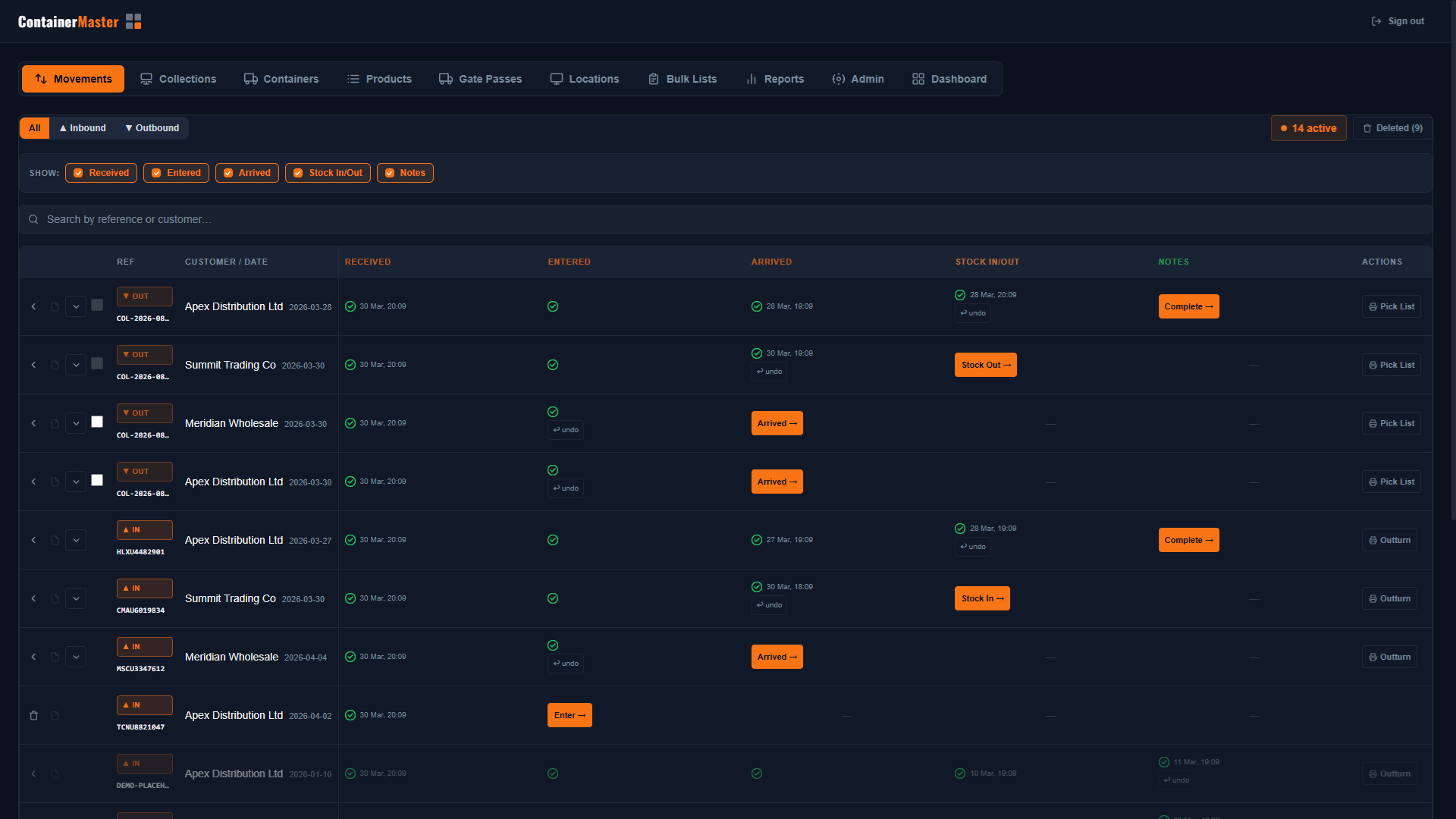
Every movement — inbound or outbound — flows through a clear, reversible 5-stage pipeline you can advance with a single click.
- Stage 1: Received — Booking created, auto or manual
- Stage 2: Entered — Details confirmed, product lines logged
- Stage 3: Arrived — Lorry physically on site, timestamped
- Stage 4: Stock In / Out — Inventory updated in real time
- Stage 5: Completed — Notes added, movement finalised
- Filter All / Inbound / Outbound movements independently, show or hide stages to reduce noise
“Every stage has an undo button — correct mistakes instantly without losing data.”
Gate Pass System
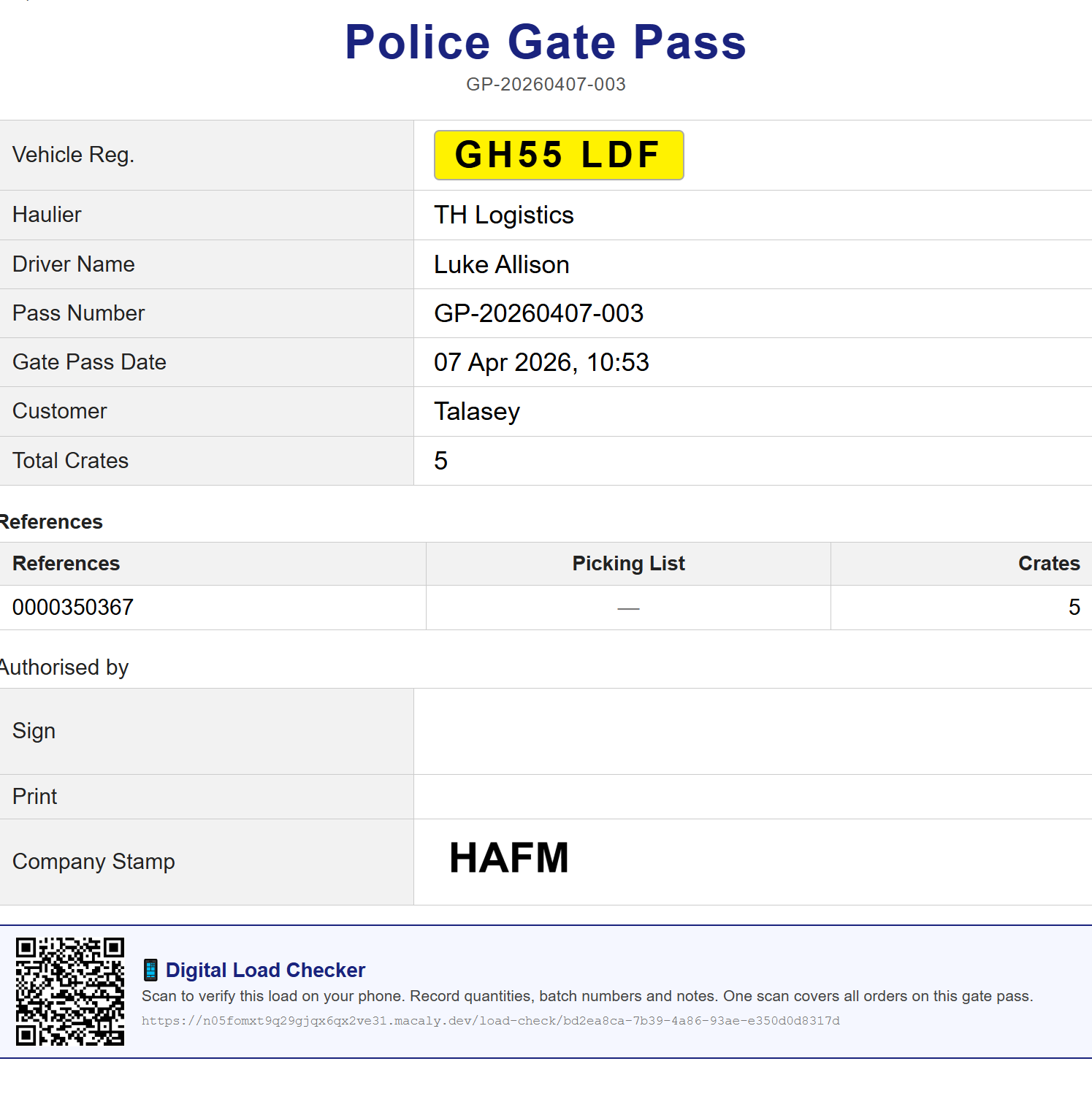
Three types of gate passes generated automatically at the right stage — with a full searchable history tab, filters, CSV export, and a secure QR code that activates the Digital Load Checker.
- Arrival Gate Pass — issued when a container arrives on site, includes driver, haulier, registration, and container refs
- Collection Gate Pass — issued when a customer collection departs, includes multi-drop load plan if applicable
- Container Gate Pass — issued for empty containers leaving the site
- Gate Passes history tab — filter by pass type (Collection / Container / Arrival / Bulk), checked status, or free-text search
- CSV export — download your entire filtered gate pass history as a spreadsheet
- Type badges — Container, Arrival, and Bulk passes display colour-coded badges in the table for instant identification
- Each gate pass includes a unique secure QR code — scan it on any phone to launch the Digital Load Checker
- Reprint any gate pass instantly, or resend the load check email report from the history tab
“Every gate pass is stored, searchable, and exportable — and doubles as the key to the mobile load checker.”
Digital Mobile Load Checker
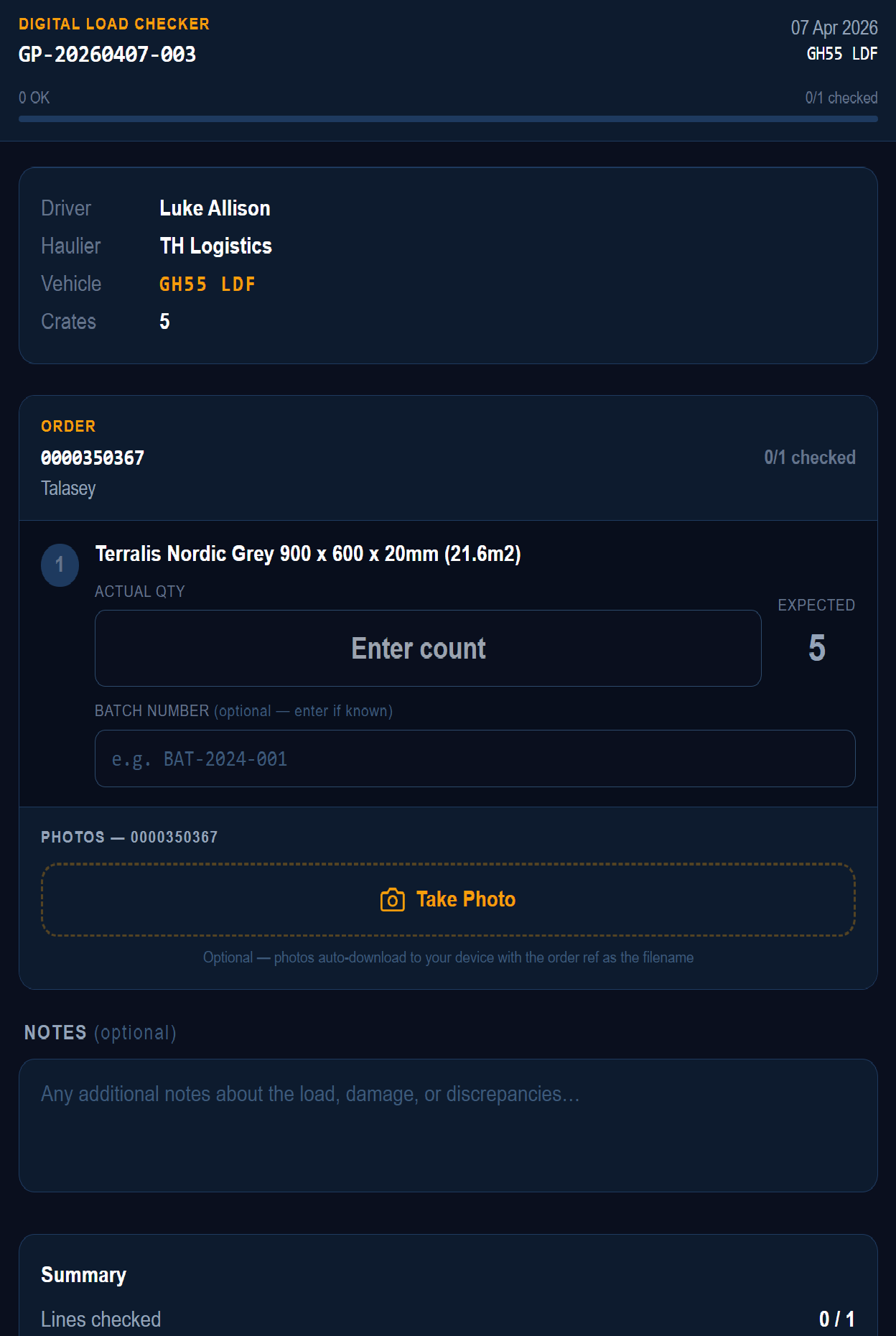
Replace paper-based load checking with a mobile portal that works in any phone browser — no app to install. Scan the QR code on the gate pass, check the load, submit. Done.
- No app required — works in any mobile browser by scanning the QR code printed on the gate pass
- Checklist shows every product line with expected quantities, grouped by order — multi-drop loads all in one view
- Large thumb-friendly quantity inputs with a live progress bar showing how many lines are checked
- Batch number confirmation — checker confirms or records the batch number found on each pallet
- Photo capture — take photos on the phone; auto-downloaded with the order reference as the filename for easy filing
- Progress auto-saved — if the phone locks mid-check, nothing is lost
- On submission: result saved with full audit trail, email report sent automatically showing each line as ✓ OK or ✗ DISCREPANCY
- Discrepancy emails are flagged in the subject line — impossible to miss
- Once submitted the form becomes read-only — no double-submitting
- Gate Passes tab shows which passes have been checked vs outstanding at a glance
“Paper load sheets replaced by a phone in the checker's pocket — with an automatic email audit trail on every load.”
Outturn Reports & Picking Lists
Professional printed documents — outturn reports for inbound stock and picking lists for outbound collections — formatted for the warehouse floor.
- Outturn Report — A4 document listing all product lines, expected vs actual quantities, condition column, and signature boxes
- Collection Picking List — per-collection document with product descriptions, bay locations, quantities, batch numbers, and check boxes
- Multi-drop loads include the lorry loading diagram on the picking list, with load position and drop sequence per line
- Customer Portal — unique secure link sent by email after stock-in or collection, giving the customer a clean, printable report — no login required
“Customers receive their report automatically — no calls, no emails, no manual sending.”
Real-Time Stock & Locations
Live stock levels across all products and warehouse locations, updated the moment inventory changes — with bulk import for fast opening stock entry.
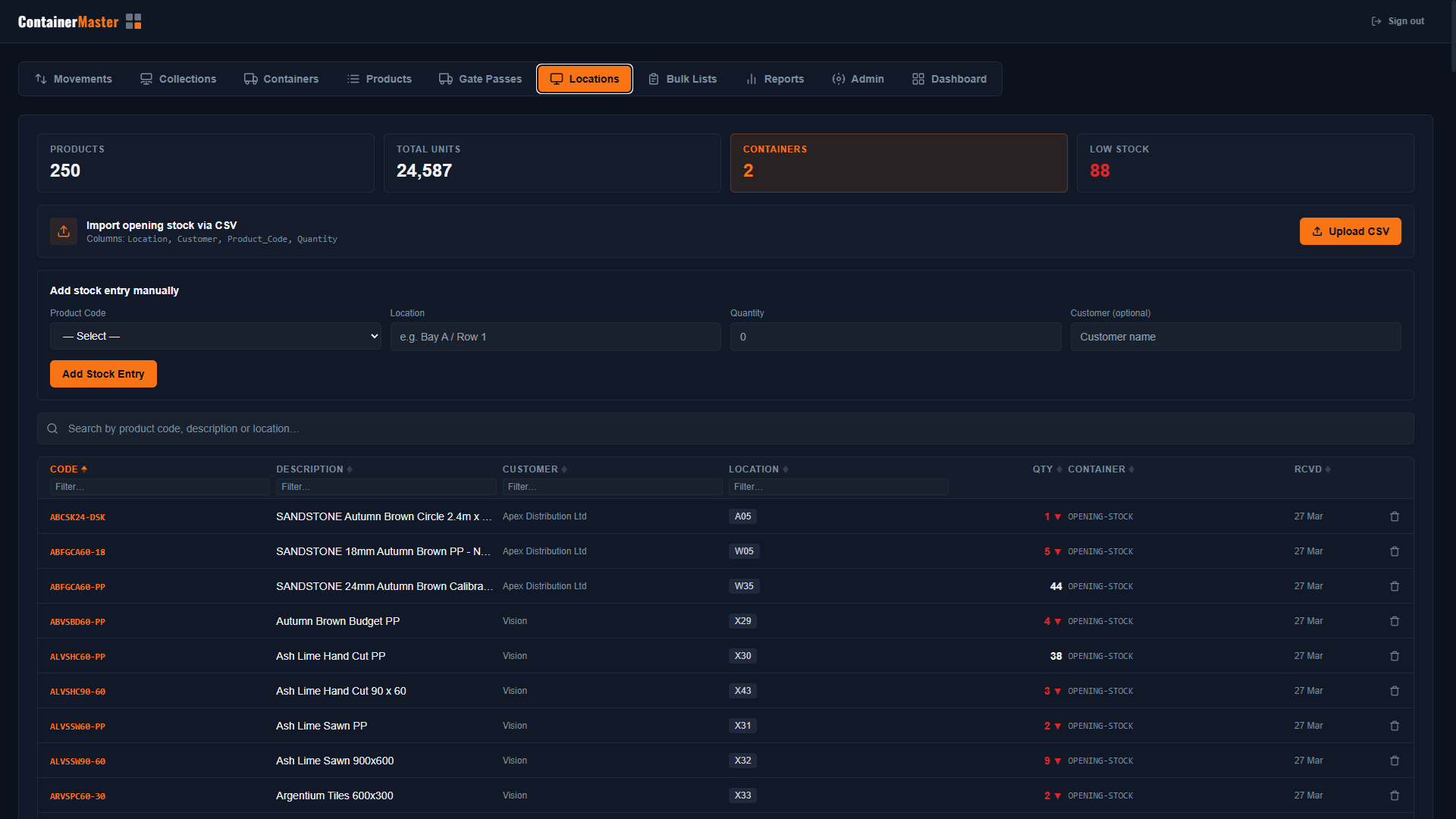
- Live stock levels per product per location (e.g. Bay A / Row 1) — updated atomically on every movement
- Summary cards: total products, total units, active containers, and low stock alerts
- Inline location and quantity editing directly from the Locations tab
- Bulk CSV import for opening stock: Location, Customer, Product Code, Quantity columns
- Manual stock entry for single-line adjustments without importing a file
“Know exactly what you have, where it is, at all times.”
Products Management
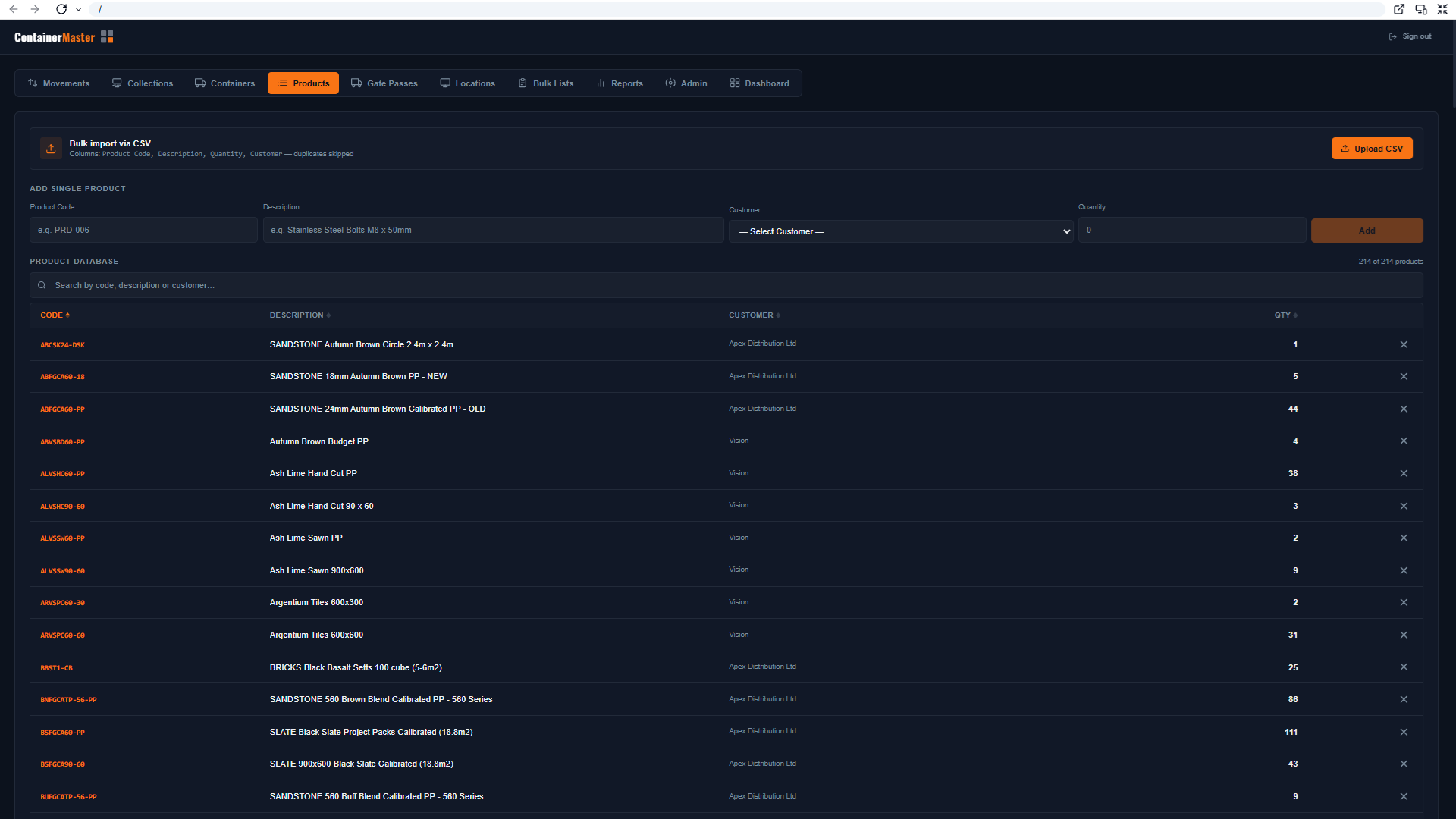
Full product catalogue with per-customer product codes, default bay locations, bulk CSV import, and admin-controlled deletion — ready to scale.
- Products linked to specific customers — full support for multi-client warehousing
- Default Bay Locations — set a Default In Bay (for receiving) and a Default Out Bay (for picking) per product; these auto-fill the location field during stock-in and picking, cutting keystrokes on every movement
- Manual product creation: Product Code, Description, Customer, and opening Quantity
- Bulk CSV import with automatic duplicate detection — no re-importing existing products
- CSV format: Product Code, Description, Quantity, Customer
- Searchable and sortable table with Code, Description, Customer, and Qty columns
- Admin-only delete — the remove button is hidden from operatives; admins see a two-step confirmation before anything is deleted
“Default bay locations cut keystrokes on every movement — and bulk import saves days of setup.”
Bulk Picking Lists
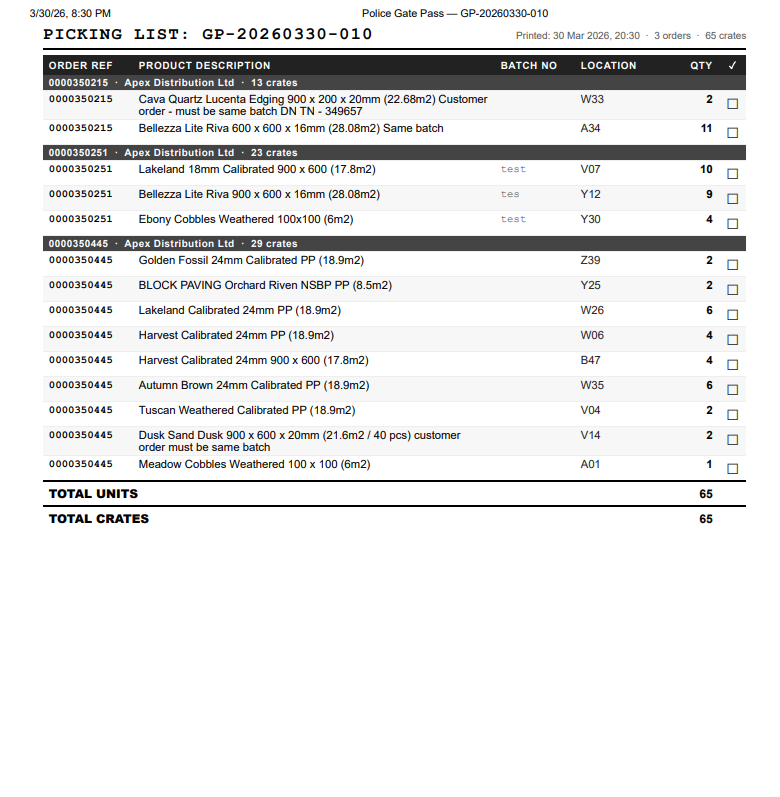
Select multiple collections in one step and generate a single combined picking list and gate pass — ideal for pallet network operators.
- Select multiple collections from the Movements tab using checkboxes — one action, all orders
- Generates one combined picking list and gate pass covering all selected collections in a single document
- Compact, print-optimised layout — Order Ref, Product Description, Batch Number, Location, and Quantity
- Hand-tick checkbox column for physical load checking on the warehouse floor
- Gate pass reference includes date, order count, line count, crate count, driver, and vehicle details
- Perfect for pallet networks — Palletways, Pallex, Palletline, and similar
“Cut picking paperwork from multiple sheets to one — every load, every time.”
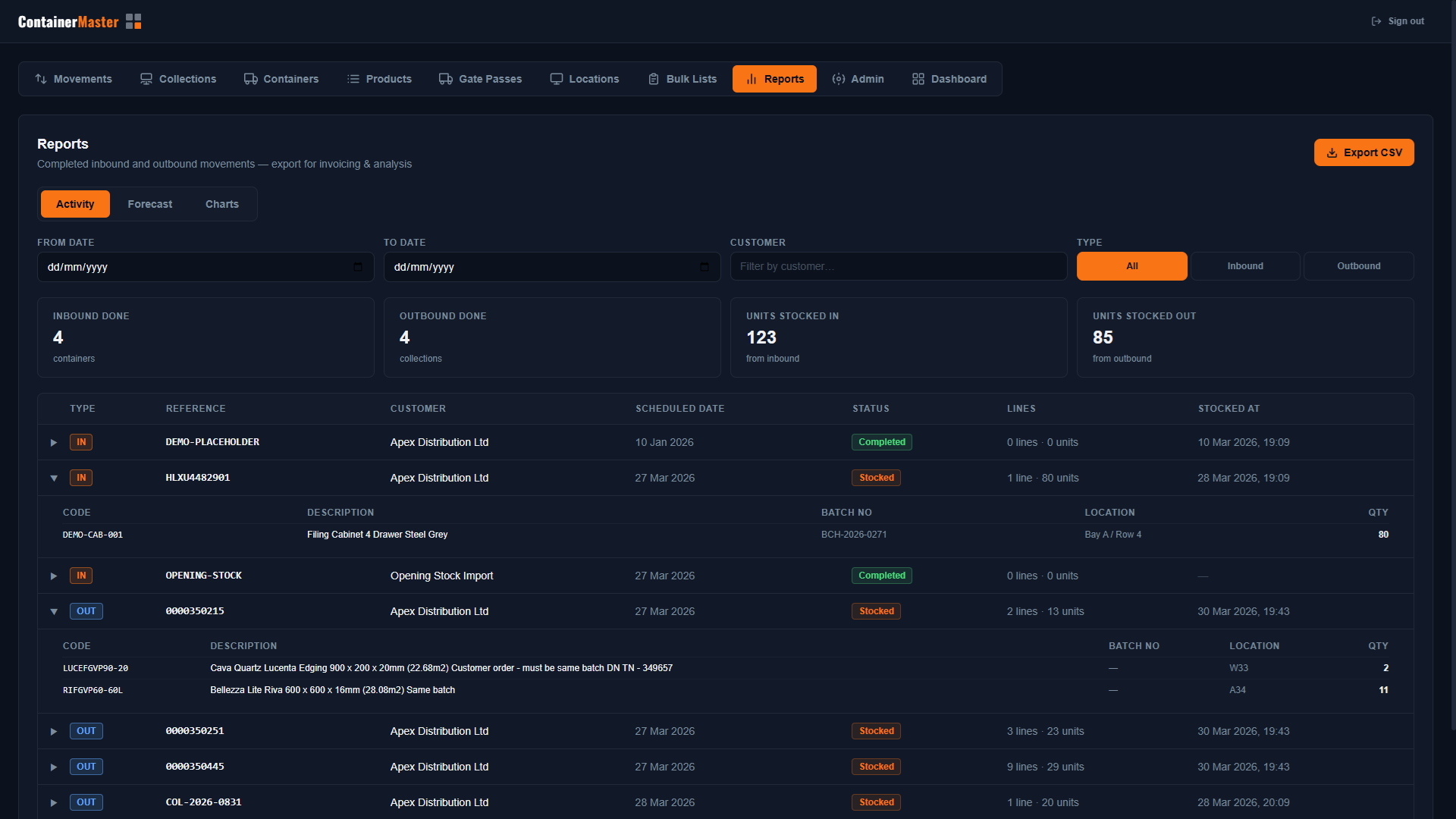
Reports Tab with Live Charts
A real-time visual overview of warehouse activity — completed movement history with CSV export, container forecasts, and live stock analytics in three dedicated views.
- Activity view — completed inbound and outbound movements with date, customer, and type filters; expandable to show product line detail; export to CSV for invoicing
- Forecast view — upcoming container arrivals and pending collections, sortable by date and filterable by ship name
- Charts view — donut charts for top products by inbound and outbound volume, customer volume bar charts, product overlap table, and movement timeline
- All data updates live as movements are recorded in the system — no manual refresh needed
“See the full picture of your warehouse at a glance — no spreadsheets, no manual collation.”
Container Management
End-to-end management of inbound shipping containers from advance booking to stock-in — with PDF packing list scanning to eliminate manual data entry.
- Book containers with container number, ETA, customer, and ship name
- Attach a PDF packing list — CM4 auto-reads the container number and product lines
- Product lines auto-populated from the PDF; edit quantities, batch numbers, and locations before confirming
- Active container register shows all current and received containers at a glance
- Full audit trail from booking through to stock-in with timestamps at every stage
“PDF auto-scanning saves operators hours of manual data entry per container.”
Secure Authentication
Email and password sign-in with OTP verification — only authorised users access the system.
- Email and password sign-in with OTP email verification
- Secure, role-based access — only signed-in users can access the system
- User initials shown in header, one-click sign-out
“Your warehouse data stays secure — no public access, ever.”
Soft Delete & Restore
Nothing is ever permanently lost — deleted items are archived and fully restorable.
- Containers and collections can be soft-deleted — removed from view without losing any data
- Deleted items viewable and restorable from a toggle on the Movements tab
- Full audit trail preserved on deleted records
“Accidental deletions happen. ContainerMaster 4 makes recovery instant.”
Email Notifications
Automatic customer notifications after key events — no manual follow-up required.
- Outturn report links sent directly to customers by email after stock-in
- Collection report links sent directly to customers by email after collection
- Customers view a clean, printable portal page — no login needed
“Your customers are informed automatically — it just happens.”
See It Running In Your Warehouse
Every feature shown here is live and ready to deploy. Book a demo and we'll walk you through the system with your own products and customers.
Book a Demo